Recording without cell service
Learn what AgriPath records offline, what needs internet, and how to prepare your Android phone for screen-off recording and interrupted sessions.
Read the guide →
GPS spray coverage app · Android beta
AgriPath is a mobile field spraying app for Android. Record GPS coverage, see overlapping passes, and save spray-session records on your phone. Recording works offline; satellite imagery and optional weather need internet.
Free during beta. Android available for testing. iOS under consideration.
Weather and wind alerts: US locations only. GPS recording does not require weather. International use
From a pass to a saved record
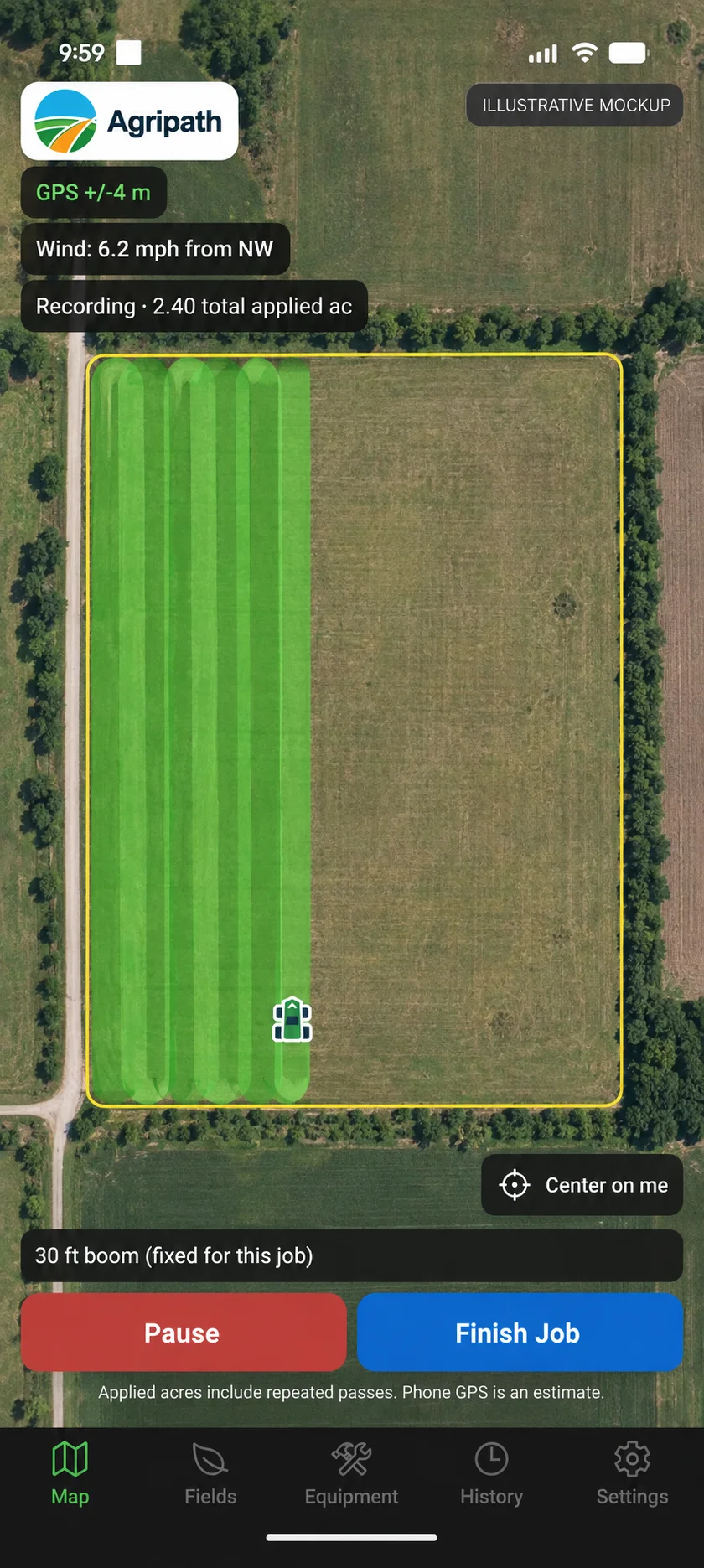
Set your boom width and start recording. AgriPath draws approximate coverage as you move, shades repeated passes, and adds up total applied acres.
Finish with a record you can find again: the field, date, product, rate, water volume, and recorded coverage. Save it on your phone and export it when you need to share.
Built around the job you already do.
How it works
Create an equipment profile with your actual spray width in feet. Choose the right profile before starting each job; coverage calculations use that width.
Optionally record a boundary by driving the perimeter, then name the field. You can reuse saved boundaries or record a session without a field.
Press start. A swath polygon paints behind your position at the configured width. Overlap zones appear darker so you can see double-applied passes at a glance. Total applied acres tick up live, including repeated passes.
Finish Job pauses recording. Save the job with product, rate, water volume, and field, or save and share an export. Export as GeoJSON or KML to a compatible mapping app or share it from your phone.
What’s in it
Before you try it
AgriPath helps you keep track of passes and save useful session records. Here is what to expect from the Android beta.
Practical guides
Prepare for a session, understand the coverage, and share the result.
Learn what AgriPath records offline, what needs internet, and how to prepare your Android phone for screen-off recording and interrupted sessions.
Read the guide →Understand AgriPath GPS accuracy readings, coverage gaps, boom width, overlap shading, and why total applied acres differ from unique field area.
Read the guide →Save and export AgriPath spray sessions as GeoJSON or KML. See which coverage and session details are included, and how to retry sharing from History.
Read the guide →Before your first session
Core GPS recording, field boundaries, local records, and GeoJSON/KML exports have no US-only location restriction. They are expected to work outside the US, but international use has not been field-tested. Map imagery depends on the map provider's coverage. Weather forecasts and wind alerts are supported for US locations only. The current interface is English and uses feet, acres, gallons, and mph.
GPS recording, swath rendering, total applied acreage, field boundaries and saved records work offline. Tracking-only map mode shows saved fields and coverage without satellite imagery. Satellite imagery and new weather forecasts require internet. Offline satellite downloads are not supported.
Phone GPS accuracy varies with the device and surroundings. AgriPath shows reported accuracy and excludes poor fixes and implausible jumps. It is an approximate recording tool, not precision guidance, auto-steer or section control. Total applied acres include overlaps and repeated passes, not just unique field area.
Spray records, field boundaries and equipment stay on your phone unless you export them. Optional weather sends rounded coordinates through the AgriPath weather gateway on Cloudflare to the National Weather Service and possibly WeatherAPI.com. Google Maps also processes data under its privacy policy. Read the AgriPath Privacy Policy for details.
The current beta is Android only. We are focusing on Android reliability before deciding when to build the iPhone version. There is no iOS release date.
The Android beta is free to test. Final pricing and the public release date have not been announced. Existing records remain on your device.
GPS recording and an illuminated screen use battery. Battery life depends on your phone, settings, and session length. Plan a charging option for longer jobs. Screen-off recording is supported when Android permits background tracking.
Saved sessions export as GeoJSON or KML with coverage, product, rate, water volume, field, start date and total applied acreage. Exports remain available from History. Check the receiving organization's record requirements; a GPS log does not establish regulatory compliance.
Request the Android beta APK and tell us how recording works with your setup.
hello@agripath.app